
- Bokedex
- Apple Watch
Apple Watch · New in 1.6
Dog training on your Apple Watch
When you train a dog, your hands are full of treats and leash, and your phone ends up on the floor. Bokedex for Apple Watch puts today's sets on your wrist, so you can mark each rep, feel the hold timer and keep your eyes on your dog.

How it works
Three steps.
-
Plan on your iPhone
Bokedex on iPhone builds your dog's plan. The watch gets today's skills, steps and week on its own.
-
Train from your wrist
Start session and mark each rep as it happens. For holds, tap In position and the watch taps your wrist when it's time to treat.
-
Your iPhone keeps the record
Each set goes back to the iPhone, so the plan, the week and your dog's card stay in one place.
Screens
On your wrist
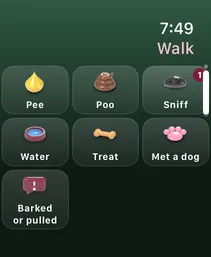
Real screens from Bokedex 1.6 on Apple Watch Ultra.
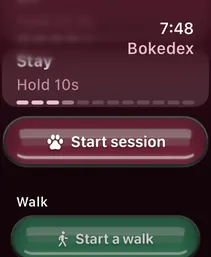
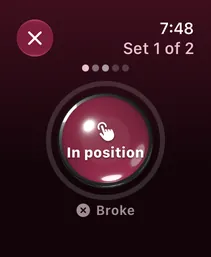
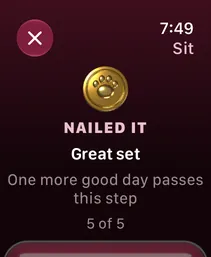
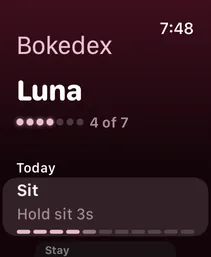
What's on the watch
- Today
-
Your dog, this week's training days and today's skills, each with its step and progress.
- Training sets
-
Short sets of reps for today's skills. Mark each one Did it or Not yet.
On Apple Watch Series 9, Ultra 2 or newer with watchOS 11, a double tap counts as Did it.
- Hold timer
-
For sits, downs and stays, tap In position. The watch taps your wrist at the target: treat, then say “Free!”.
- Daily checks
-
Questions like “Out after every nap today?”, answered with Yes, today or Not today.
- Clicker
-
A marker click from your wrist, for the moment your dog gets it right.
- Walks
-
Start a walk, see the time and distance, and log pee, poo, sniffs and more. Premium.
The same plan as your iPhone
The watch keeps a copy of today's plan and runs the sets itself, using the same rules as the iPhone. Good sets on two different days move a step forward, a rough set makes the next one easier, and after two misses the watch offers to make it easier right away. After the suggested session length (3 minutes for a puppy, 5 otherwise), the result says “Good time to stop”.
Your iPhone can stay in a pocket or a bag. Results go back to it, and if it's out of reach they wait on the watch until it's back.
Your week on the watch face
Add Bokedex to your watch face or the Smart Stack to see your week at a glance: a ring for this week's training days, or your dog's next skill and step.
Barking alerts on your wrist
If you use Home monitor, barking alerts from your iPhone show on your watch too, like any other notification. You'll know when the barking goes on without taking out your phone.
What you need
- An Apple Watch with watchOS 10 or later.
- An iPhone with iOS 17 or later and Bokedex 1.6 or later.
- The camera coach and a dog's first session stay on the iPhone, which sets up the marker word first.
Good to know. The watch app follows the plan you make on your iPhone. Use the clicker close to your dog for the clearest sound.
Questions
Apple Watch: common questions
Does Bokedex work on Apple Watch?
Yes, since Bokedex 1.6. Install Bokedex on your iPhone, and if the watch app doesn't appear on its own, add it from the Watch app on your iPhone.
Is the Apple Watch app free?
Training on the watch follows your plan: anything you train on the iPhone, you can train from your wrist. Walks on Apple Watch are part of Premium.
Which Apple Watch do I need?
Any Apple Watch with watchOS 10 or later. Double tap needs Apple Watch Series 9, Ultra 2 or newer with watchOS 11.
Do I need my iPhone nearby?
Not for a set. The watch runs today's sets itself and sends the results to your iPhone when it can.
Can I use the camera coach on the watch?
No. The camera coach needs the iPhone's camera. On the watch, you time holds with the hold button instead.
Guides
Read next
Also in Bokedex
The rest of the dex
 No. 002
 Bark
Record a few seconds and find out what the bark is about, and how worked up your dog is.
Alert · Attention · Food · Play No. 003
 Breed
One photo gives the closest breeds, mixes included, with a profile for each breed.
120 breeds No. 004
 Mood
A quick read of your dog's face from one photo, with what it usually means and one thing to do.
Happy · Relaxed · Tense · Low No. 005
 Train
Step-by-step plans for 19 skills, in sets of a few minutes. A camera coach times sits and stays.
19 skills · 4 stages No. 006
 Calm to sounds
A six-step drill that gets your dog used to the doorbell, thunder, fireworks and more.
7 sounds · 6 steps No. 007
 Home monitor
Leave a spare iPhone at home. See when your dog barked, for how long and what kind of bark it was, with an alert if it goes on.
Premium · Your iCloud No. 008
 Walks
Track the route, time and distance, and log pee, poo, sniff stops and dogs you meet with one tap.
New · iPhone & Apple WatchTrain from your wrist.
Bokedex is free to download for iPhone and iPad. No account needed.