
- Bokedex
- Home monitor
No. 007 · Home monitor
A dog barking monitor for when you're out
Does your dog bark all afternoon, or do the neighbors have it wrong? Leave a spare iPhone or iPad at home with Bokedex listening. You'll see every barking episode on your own phone, with short clips and an alert if it keeps going.
How it works
Three steps.
-
Set up the spare phone
On the device that stays home, open Home monitor, choose Use this iPhone as the monitor and tap Start listening. Plug it in for long days.
-
Head out
It keeps listening with the screen locked. Speech, TV chatter and other sounds are dropped; only moments with a dog are kept.
-
Check in from anywhere
Your own phone, signed in to the same Apple Account, shows the timeline and gets an alert if barking goes on.
What you see on your phone
- Timeline
-
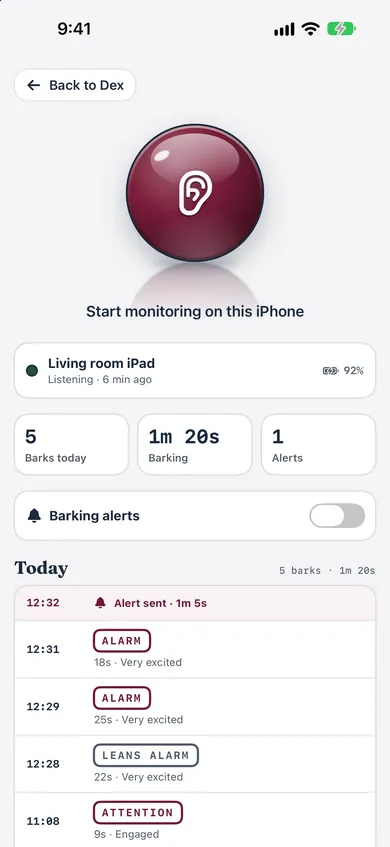
Each barking episode with its time, length and kind of bark, like alert or attention.
- Excitement
-
How worked up your dog sounded: calm, engaged or very excited.
- Clips
-
Turn them on to keep a 6-second clip of each episode and hear it for yourself.
- Totals
-
Barks today, total barking time and alerts sent.
- Monitor status
-
Which device is listening, its battery level and when it last checked in.
Alerts that don't flood you
Choose when to hear about it: after 30 seconds, 1 minute or 2 minutes of barking within five minutes, or turn alerts off. You'll get at most one alert every 15 minutes, and none while you're looking at the monitor. The alert tells you your dog's name and how long the barking lasted.
Built for a phone on a shelf
The monitor checks in every 15 minutes, so if it goes quiet for about 40 minutes, your phone shows that it may have stopped. You also see its battery level, so you know when to plug it in.
Private by design
Barks sync through your own private iCloud database. There's no Bokedex server, and we can't see or hear anything. Without iCloud, the monitor still works and keeps the timeline on the home device. Episodes and clips are deleted after 7 days.
Using what you find
Barking that clusters in the first minutes after you leave is worth a closer look. Bokedex's Quiet at home and Separation distress plans start there, and a vet or behavior professional can help when it's panic rather than boredom.
What it can't do. It hears the room it's in, so put it where your dog spends the day. It's audio only, not a camera, and a dog barking on TV can sound like a real one.
Questions
Home monitor: common questions
Do I need two devices?
Yes: a spare iPhone or iPad that stays home, and your own iPhone to check the timeline. Both need to be signed in to the same Apple Account.
Does it keep listening with the screen locked?
Yes, until you tap Stop monitoring. iOS shows its microphone indicator the whole time.
Is Home monitor free?
Home monitor is part of Bokedex Premium.
Does it record everything?
No. Sounds are checked on the device and only episodes where a dog is heard are kept. Clips are optional and last 6 seconds.
Can my partner see the timeline too?
It shows on devices signed in to the same Apple Account as the monitor. Sharing with a different Apple Account isn't supported yet.
How much iCloud storage does it use?
Very little. Episodes are small records, clips are 6 seconds, and everything is deleted after 7 days.
Guides
Read next
Also in Bokedex
The rest of the dex
 No. 002
 Bark
Record a few seconds and find out what the bark is about, and how worked up your dog is.
Alert · Attention · Food · Play No. 003
 Breed
One photo gives the closest breeds, mixes included, with a profile for each breed.
120 breeds No. 004
 Mood
A quick read of your dog's face from one photo, with what it usually means and one thing to do.
Happy · Relaxed · Tense · Low No. 005
 Train
Step-by-step plans for 18 skills, in sets of a few minutes. A camera coach times sits and stays.
18 skills · 4 stages No. 006
 Calm to sounds
A six-step drill that gets your dog used to the doorbell, thunder, fireworks and more.
7 sounds · 6 stepsTry Home monitor on your dog.
Bokedex is free to download for iPhone and iPad. No account needed.