
Release notes · Bokedex 1.6 fixes
What we fixed in Bokedex 1.6: progress you keep, calmer noise drills
Walks and the Apple Watch app got the headlines in Bokedex 1.6. Underneath them is a long list of fixes, most of them about how training, barking and the Home monitor fit together day to day. Here's what changed, and why.
The short version
- Training. Going back a step no longer costs the days your dog earned, a dog who already knows a step can test past it, and editing a plan never drops a skill you're working on.
- One dog. The Dex home, Train and the Bark screen always show the same dog, and a breed read can go straight onto your dog's card.
- Barking and noises. Quiet minute holds its clock while your dog barks, unclear bark reads don't use a free read, and Calm to sounds keeps its progress for each dog.
- Home monitor and Apple Watch. A clearer first screen on the phone you carry, and watch sessions that still reach your iPhone after it's been out of range.
Training progress you don't lose
Bokedex teaches each skill as a ladder of small steps. A step passes after good sets on two different days, so one lucky afternoon doesn't push your dog on too fast. That rule is the point, but a few things around it worked against you. They're fixed:
- Going back keeps your days. If a step gets hard, tap an earlier one and choose Go back to this step. When your dog climbs back up, the good days they had already earned on the harder step are still there.
- Already does this? Test it. Tap an upcoming step and run one set to skip ahead. It's limited on purpose: within the same stage, never past a longer hold, not on a day the skill was already trained, and never for skills that need extra care, like recall, leash walking, handling or greetings. A test that doesn't pass leaves no trace, not even a session.
- Editing a plan keeps what you train. Change your goals and the skills in progress stay. New goals add their skills when there's room, and a skill you removed doesn't sneak back.
- Solid means the finished skill. A skill is solid once it works in two different places. Now only practice on the last step counts toward that, so an early lure session in the park no longer counts as “the park”.
- Today matches Train. The Today tile on the Dex home now says what the Train tab says: your next skill and step, a daily check that's still open, or that you're done for the day.
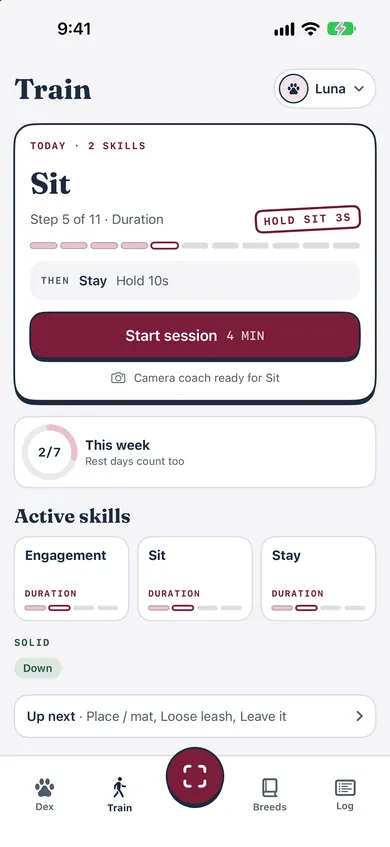
Every step is still built on reward-based training: mark the moment, treat, and make it easier when your dog struggles. See how training works in Bokedex.
A free plan that starts in the right place
The free plan trains three skills at a time. If your goals pointed at a skill your dog wasn't ready for, or at a Premium routine, the plan used to skip it without a word, and a goal like Calm at home could end up with a single skill. Now it starts one step earlier: a plan that wants Place starts with Down, because Place is built on it. Routines like House training and Calm in the crate are still Premium, but the plan names them in one line, so you can see what your goals include.
One dog, everywhere in the app
With more than one dog, the Dex home always showed the first one, while Train showed the dog you'd picked. Now there's one current dog: pick them in Train, and the Dex card, Today and the Bark screen follow.
- The name you type during onboarding creates your dog, so the Dex card isn't empty on day one.
- Edit a dog at any time: name, photo, breed, birthday and goals. You can delete a dog too.
- Your dog's own photo sits on their Dex card.
What breed is my dog? Save the answer to their card
A breed read from a photo used to stop at the result. Now, when the read is clear or likely, there's a button with your dog's name on it, like Set as Luna's breed. For a mixed-breed lead it saves the family instead, such as “Terrier mix”. Unclear reads don't offer the button, so a guess never ends up on the card. Here's how the dog breed identifier works, and why breed traits aren't the whole dog.
Barking at everything? Make quiet the thing that pays
“How do I stop my dog from barking at everything?” is a question more and more owners are typing into Google. There's no single answer, but one reliable piece is to reward quiet instead of scolding noise. That's what Quiet minute (Premium) does: the phone listens, and after a quiet stretch it buzzes “Treat now”. The fix is in the timing. If your dog barks, the clock now waits until the barking stops, then the quiet stretch starts again from zero. A treat only ever follows real quiet.
Bark reads got more honest too. A clip the model isn't sure about shows as an Unclear read, and it doesn't use one of your free reads, so you can try again. Our guide to recording cleaner bark clips helps, and so does knowing what each kind of bark means.
Dog scared of fireworks? Start Calm to sounds now
Fireworks season is close. Halloween, Bonfire Night, Diwali and New Year's Eve all land before the year is out, and searches for “dog scared of fireworks” climb from mid-October. The fear is common: in a survey of 1,225 dogs, 52% were at least partly affected, most of them from their first year. The same study found that teaching puppies, and adult dogs who aren't afraid yet, to link the noise with good things was highly effective at preventing the fear later.
Calm to sounds, on the Bark screen, does exactly that a step at a time. Pick a sound (doorbell, knock, another dog, fireworks, thunder, vacuum or siren), play it faintly from the next room and treat right after. Five plays make a set, and six steps take it from “Next room, faint” to near real level while you move around. In 1.6 it works like Train: progress belongs to each dog, a step passes after calm sets on two different days, a hard set steps back, and every visit counts toward your dog's week.
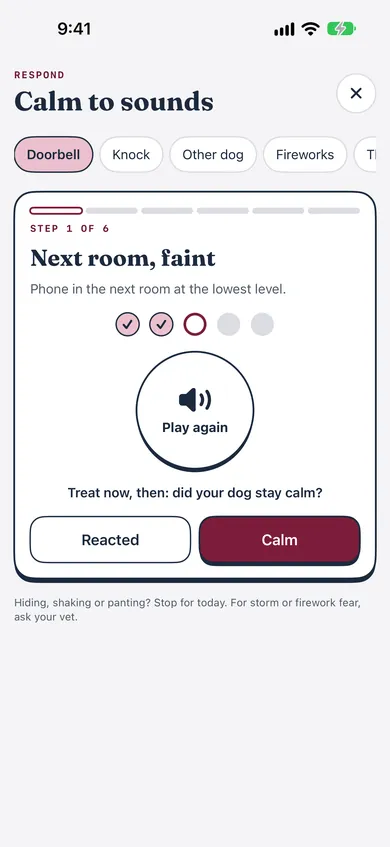
Start at the faintest step, keep sessions short, and stop for the day if your dog hides, shakes or pants. For strong storm or firework fear, talk to your vet. There's more in helping a dog who's scared of noises.
Home monitor: clearer on the phone you carry
Home monitor turns a spare iPhone or iPad into a dog barking monitor while you're out. On your own phone, the first screen used to lead with “Start monitoring on this iPhone”, which is the wrong job for the phone in your pocket, and alerts stayed out of sight until the monitor heard something. Now the first screen asks which device this is: Use this iPhone as the monitor, or This is my iPhone: get barking alerts. On your phone, turning on alerts is the whole setup.
If the log shows barking soon after you leave, write it down: it's one of the first things a trainer or vet will ask about. Our guide on when to get professional help covers the signs.
Apple Watch: steadier sync, new buttons
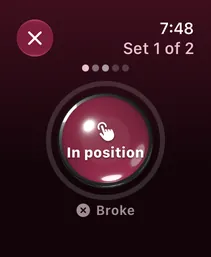
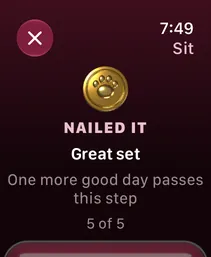
Training on the watch no longer needs your iPhone nearby: the session waits on the watch and arrives when the phone is back in range. Each set is kept as soon as you finish it, so a session cut short, or an app that closes halfway, still counts. After midnight the watch opens the new day on its own instead of waiting for the phone. The controls are new as well: rendered 3D buttons in Bokedex colors, big enough to hit with a hand full of treats. More about Bokedex for Apple Watch.
Smaller touches
- A new dog's first session starts by loading the marker, so “Yes!” means a treat is coming before any real training.
- On a breed's profile, long Character traits wrap inside the card instead of running off the edge.
- Tab icons fill in when selected, so you can see where you are at a glance.
- Onboarding has new 3D art: a German Shepherd sitting, listening, giving a paw, lying on a mat and play bowing.
Update to Bokedex 1.6
All of this is in Bokedex 1.6, on the App Store now in English and Italian for iOS 17 or later. Walks and the Apple Watch app have their own post. Most of these fixes came from walking through the app the way a new owner would, so if something still feels off, I'd like to know: get in touch.